In last month’s issue of Fermenting Solutions, I wrote about how bot traffic at Threddies was beginning to cost us real money. A few months before that, I wrote about the impact on non-ecommerce sites. I discussed how I used CloudFlare’s AI Crawl Control and bot detection to mitigate unwanted traffic and reporting problems. Automated traffic is posing bigger and bigger problems for website owners every day. How do you know if you have a ‘problem’? What can you do to address it?
The “Problem”
The first time I mentioned bot traffic being a problem, not everyone agredd with me. I was met with the response that having more traffic is a ‘good thing’. Back in the days when anyone investing in a web property only cared about how many ‘users’ it had, maybe this was the case. The ugly reality is that for the most part, ‘bots’ aren’t contributing to your ad revenue or purchasing your products. In fact, automated traffic, might secretly be costing you money. For the rest of this post, I’m going to focus specifically on Shopify stores. Much of this information will obviously be applicable elsewhere with slight tweaks.
Identifying ‘bots’
So how do you know if you have a bot problem? Well, if you monitor your analytics, you’ll probably notice a large influx of traffic. This isn’t always the case. I’ve watched the techniques used by whatever is doing this evolve dramatically over the last few months.
In Shopify, beyond the traffic increase, I noticed a few other things:
- An uptick in abandoned carts. This occurred both in number and as an increase in abandoned cart rates.
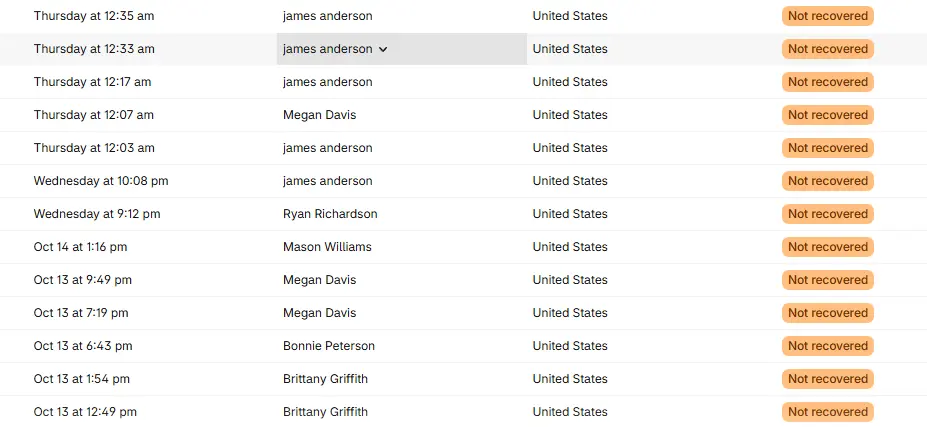
- Multiple customers being created that shared the same name, phone number and/or address. James Anderson, Megan Davis, Brittany Griffith and Bonnie Peterson were favorites.
- Customers that would sign up for our email list and then almost immediately unsubscribe
Why it’s a Problem
So maybe at this point, you can see how this is a problem in terms of skewing analytics. Any type of reporting that you would want to do can’t be considered reality. What is the ‘real’ abandoned cart rate? How can I compare that now to prior time frames? How can I judge my email engagement rates now? The list goes on. In the early days this was the first thing that really started to annoy me, but the problems got deeper.
I would look at analytics from the day before. I’d see multiple abandoned carts a minute by obvious bot accounts. Unfortunately, I couldn’t mitigate this using CloudFlare like I had for other sites. This is because Shopify does not give you that level of control on most plans.
Drain on Shopify Infrastructure
I watched this for days, all while Shopify experienced outages hear and there (mostly for the checkout infrastructure). I thought surely, they must be aware of this obvious issue and are working on doing something to stop it. Even though it’s a reporting nightmare for me, it’s obviously wasting Shopify resources. It’s probably a major burden for them, especially when considering that other stores are likely experiencing this same thing?
We reported this issue in detail several times to Shopify and each time we were essentially told that we were on our own for dealing with it. They really didn’t seem to care much about addressing this and provided hacks for essentially excluding things from reports, but nothing that would conceivably address the root issues.
Credit Card Processing Costs
I honestly kind of ignored the problem for a bit and just added notes to all of my metrics that we can’t really compare things any more in a reliable fashion. Then this traffic started attempting (and in many cases succeeding) in placing orders.
Again, at first, many might think, “that’s great!”… automated traffic actually buying products.. but again, the downstream problems really get bad. None of these bots really want our products. They don’t even use real addresses most of the time. My best guess is that they are trying to test credit card information. The abandon carts are always small. Usually sub $10. When a charge would succeed, we’d either discover that the product was pretty much unshippable or we’d get hit with a credit card chargeback. For anyone unaware, if you get a chargeback as a merchant, it costs you and you can’t really get that cost reversed without ‘fighting’ the chargeback. This process tends to take a decent amount of time and effort and it is essentially a losing battle if you can’t provide proof of delivery.
Third Party Systems Bloat
As this problem continued to get worse it started to be a burden on other systems that we rely on. Because of the growth in subscribers, I noticed customers reaching their subscriber limit in their email marketing platforms. Even for those who did not use a 3rd party email platform and relied solely on Shopify’s product, this radically increased the total number of emails per month that they sent through Shopify which incurred additional costs. In both of these cases, who knows what negative impact this ultimately had on email deliverability for the domains.
For Threddies specifically, we also use Zapier to connect all of the various disparate systems with automation and SOPs. Since much of this hinges on propagating information about customers and keeping it in sync. We began to notice that we were steadily reaching our monthly quotas in days. Something had to be done because all of this was starting to cost real money.
The Solution(s)
So how can you fix this? First and foremost, you need to identify the ‘bot’ traffic. We started doing this manually. Since the reporting was the original annoyance, we started using Shopify’s proposed ‘hack’ early on and tagged anything in Shopify that supported tags as ‘bot’ the moment we identified something suspicious. This required every report that we use now to have an “ignore ‘bot’ tag” filter in order to provide meaningful data.
Automated Identification
Obviously, tagging the enormous amount of data that was related to automatic traffic manually was never going to happen. So I started looking for patterns and then writing Shopify Flows to auto tag any data that matched the identified patterns. Each time we had to do this, we had to evaluate the implications of falsely tagging something that was legitimate traffic and how we would deal with it if that was the reality.
Preventing Abuse
Once the traffic was beginning to be identified. One of the highest priority items was to prevent that automated traffic from placing orders in order to avoid the chargebacks. It was easy enough to create a new Flow that would automatically cancel and refund any order placed by bot traffic. This prevented the inevitable chargeback but still suffered from a different problem…immediate cancellation and refund. Here’s the gut punch though: payment processors don’t refund processing fees. For most Shopify customers that’s costing you 2.9% + $0.30 per each transaction. To eliminate this cost, you need to turn off automatic payment processing. When doing this, you can avoid the manual payment processing step for legitimate orders, by creating another Shopify Flow that automatically processes the payment for any orders that are not attributed to ‘bot’ traffic.
Mitigate Impact to Infrastructure
Regarding reducing internal infrastructure costs (for Zapier, third party email services, etc.) this ultimately required exposing the ‘bot’ tag externally to Shopify. In Zapier, I built an elaborate infrastructure using Tables, Delays and Sub-Zaps that ‘remembered’ what triggers and information originated from things we identified as ‘bot’ traffic in Shopify.
Future Enhancements
It required a bit of engineering effort and still requires near constant monitoring, but we’ve ultimately been able to mitigate most of the problems caused by this. Sure it would be much nicer if we had the necessary information to identify where it’s coming from and just shutdown the traffic entirely, but given what we are able to control, this is probably the best we can do.
Whatever is causing this is constantly changing its tactics. Due to this most of the ongoing enhancements that I’m working on falls into monitoring and updating things to work with newly discovered patterns. To be honest, much of this monitoring is stuff that probably should have been in place before this occurred. I’ve currently hooked up one of my AI agents to assist with this and to help identify patterns that aren’t even obvious to me. I can then have the agent assist with the tagging.
The Call To Action
Have you experienced these or other Shopify ‘bot’ issues? I’d like to hear from you. If Shopify isn’t addressing this, it’s in the best interests of Shopify users to work together to combat these cost increasers. Reach out if you’re interested in collaborating on a solution or have other ideas. If you’re a Shopify user who is currently at their wit’s end dealing with these types of issues, I offer consulting services and can help analyze and mitigate how these problems are impacting you specifically.
Leave a Reply